


Money Network® Mobile App
3.136.12K Reviews
App Specs
- Version
- 20.0.1
- Updated On
- License
- Free
- Downloads
- 5,000,000+
- Developer
- Fiserv, Incorporated
- Categories
- Finance
- Platform
- Android
Screenshots
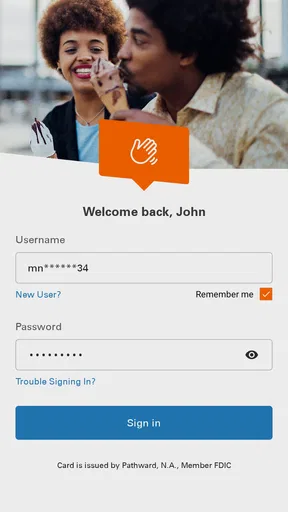
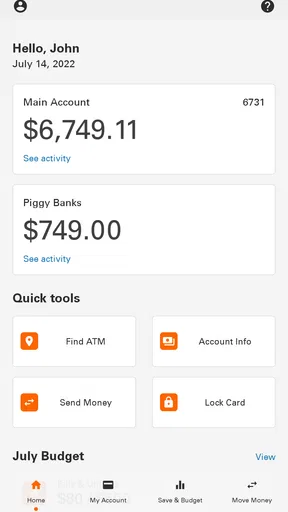
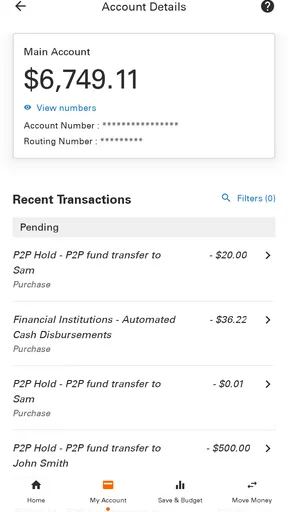
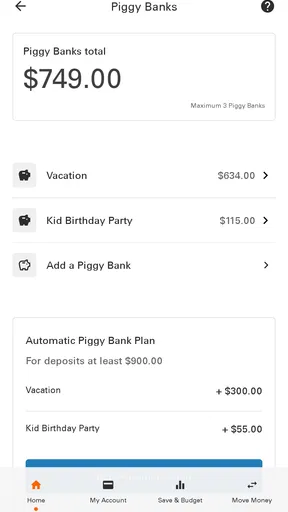
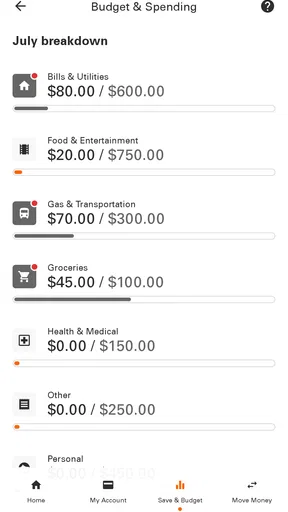
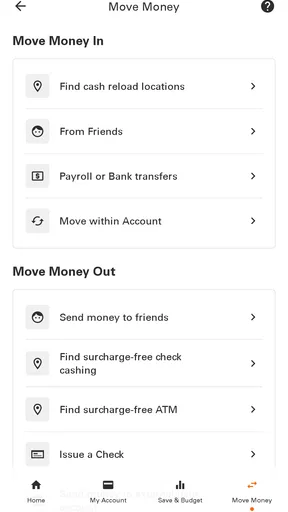
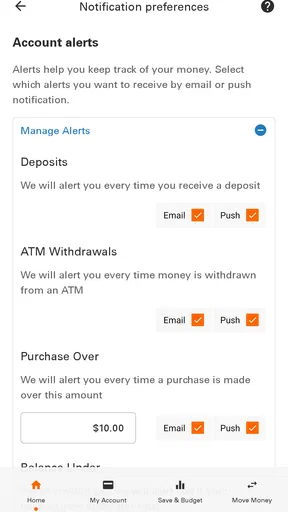
 Analysis by AppCompare
I found Money Network® Mobile App most useful as a focused companion for checking a Money Network account without opening a browser or searching through paperwork. It belongs to the finance category, is free to use, and is aimed at everyday account access rather than broad money management. My overall impression is practical: when I only need to see what is available or review recent account activity, the app keeps the task more direct than a full banking website. When I expect a complete personal-finance dashboard, investment tools, or a polished budgeting system, its narrower purpose becomes much clearer.
The app is developed by Fiserv, Incorporated, and its long presence on mobile makes it feel like an established account-access tool rather than a newly released experiment. It first appeared on March 26, 2013, and the current Android release is version 20.0.1. That history matters because finance apps benefit from familiarity and continuity, although age alone does not guarantee that every screen will feel modern. I approached it as something I would keep available for quick checks, not as the only app I would use to organize every part of my financial life.
How Money Network performs during everyday account checks
When I check a finance app during an ordinary day, I want to know what the screen can reliably tell me and what still needs a closer look. I find it useful to separate account visibility from transaction completion: a displayed balance helps with a quick decision, while a purchase or deposit may take its own course. That distinction leads naturally to the more important question of how cautiously to handle sensitive account moments.
Speed expectations when the task is simple
The strongest performance impression comes from keeping the job small. If I open the app with one clear purpose, such as checking my available balance before paying for groceries, the experience feels more manageable than navigating a general-purpose banking portal. A focused finance app does not need to overwhelm me with charts or unrelated services, and that restraint is valuable when I am standing in a checkout line or trying to confirm whether a payment will fit within my available funds.
That does not mean every action should be treated as instant. Account information depends on communication with the service behind the app, so a delay can come from more than the phone itself. I judge the app best by how clearly it handles the wait and whether the information is easy to understand once it appears. For a quick balance or activity check, the design goal is convenience; it is not the same as having a locally stored note that updates without any connection.
I also prefer opening this kind of app with a specific question in mind. Looking at the balance, then checking the latest activity, is a sensible short workflow. Repeatedly refreshing without a reason is less useful and can create confusion when a transaction is still being processed elsewhere. My practical advice is to use the app as a current account window, then allow time for transaction timing when a purchase or deposit does not appear exactly when expected.
What happens during heavier use
Money Network is not the sort of app I would describe as a demanding entertainment title or a resource-heavy creative tool. Its purpose is account information, so the important moments are concentrated around opening the app, moving between account views, and waiting for financial details to load. That makes it suitable for short sessions rather than long periods of browsing.
Worth Reading Before You Choose

EA SPORTS FC Mobile 26 Is a Bigger Football Game, but It Takes Time

Flipboard Shows What News Apps Must Do Beyond the Feed

Switching to Android Auto Means Rethinking Your Driving Routine

Google Calendar Makes a Crowded Week Easier to Manage

Ludo King Makes the Most of the Minutes Between Plans

Baby Panda World Brings Quick Play to Modern Phones, but Its Game Library Feels Busy
A heavier session might involve reviewing several recent entries, returning to the main account view, and checking details before making a spending decision. In that situation, clarity matters more than visual effects. I would rather have a plain screen that helps me distinguish available funds from a recent transaction than a more decorative interface that slows down the decision. The app’s focused role works in its favor here, because there is less reason to keep it running while I do something else.
There is also a useful trade-off in not treating the app as a complete financial command center. People who want automatic categorization, long-term spending analysis, bill planning, or investment monitoring may find the experience too limited for that kind of heavy use. A separate budgeting app or a broader bank application may be better for those jobs. Money Network makes more sense when the account itself is the center of attention and the desired action is quick verification.
A realistic day-to-day scenario
Imagine I am leaving work and need to decide whether to buy dinner on the way home. I open the app, check the available amount, and review the latest activity to make sure an earlier purchase has been reflected. If the figures look right, I can make a more informed choice without logging in through a desktop browser. That is a modest use case, but it is exactly where a mobile account app earns its place: reducing a small point of uncertainty at the moment I need an answer.
Another useful routine is checking the account before a recurring expense is due. I would not rely on a quick glance alone for a complicated financial decision, but I can use the app to establish a current starting point, then compare it with my own notes or budget. This two-step habit is safer than assuming that one number tells the whole story. The application helps me access the account; it does not replace judgment about pending obligations or overall cash flow.
For someone who receives or uses money through a Money Network account and mainly wants mobile visibility, that distinction is important. The app can reduce friction without pretending to be a financial adviser. For someone who does not use a Money Network account, its usefulness is naturally much lower than that of a general banking app connected to their everyday accounts.
Reliability and recovering from interruptions
In finance, reliability is not only about whether an app opens. I also care about whether I can recover sensibly after a weak connection, an interrupted session, or an unexpected return to the phone’s home screen. My preferred approach is conservative: reopen the app, confirm that the account view has loaded, and check the information again before acting on it. That extra moment is worthwhile when the decision involves spending or verifying a transaction.
The app’s long availability suggests that it has had time to serve a substantial user base. It has an average rating of 3.1 from around 72 thousand ratings, with roughly 36 thousand written reviews, so the public response is mixed rather than uniformly enthusiastic. I read that as a reason to keep expectations realistic. The app may be useful for its intended account checks, but users should not assume that every device, connection, or account situation will feel equally smooth.
Recovery also means knowing when not to repeat an action. If a screen takes time after I have submitted or confirmed something, tapping repeatedly is a poor habit in any financial app. I would wait, return to the account view, and verify the resulting status before trying again. This is one of the most important practical lessons: use the app for visibility, but treat uncertainty around a transaction carefully instead of attempting the same action several times.
When the app does not immediately give me the answer I need, I would separate three questions: did the application open, did the account information load, and has the transaction itself completed? Those are different events. Confusing them can lead to unnecessary worry or duplicate attempts. Money Network works best when I use it as a way to inspect the account and then allow the account’s normal processing time to do its work.
Device constraints and the right phone setup
The Android edition supports a minimum operating system of Android 7.0. That makes it accessible to people using older phones, which is a practical advantage for an account app. At the same time, an older operating system can come with broader device limitations: slower storage, less available memory, outdated system components, or a weaker connection can all influence how responsive an app feels. I would not judge the application’s speed from the operating-system requirement alone.
On a newer phone, I would expect short account-checking sessions to be a reasonable fit because the app is not designed around graphics-intensive work. On an older phone, I would keep other demanding apps closed if the account screen feels slow, make sure the device has a stable connection, and avoid judging the balance until the page has fully loaded. Those are simple steps, but they can distinguish a temporary device issue from a genuine problem with the account service.
Resource demands matter differently in a finance app than in a game. I am less concerned about sustained battery use from long sessions because I would normally open Money Network briefly and leave. The more relevant question is whether it remains dependable when I need it, especially on a modest device. Its focused purpose is encouraging, but I would still keep the phone’s operating system and basic security practices current whenever the device allows it.
People using iPhones should also check the appropriate iOS listing before installing, while Android users should pay attention to the minimum system requirement. The app is rated for Everyone, which makes its intended audience broad, but that age classification does not mean every user will find the account experience equally suitable. The account relationship itself is the deciding factor, not simply the fact that the app is available to a wide age range.
Where it beats usual alternatives
Compared with using a mobile browser, a dedicated account app can feel more convenient because it keeps the account-checking task in one place. I do not have to start from a general website, locate the correct login area, and move through pages that may be designed for a larger screen. For a person who checks the same account frequently, that reduction in steps is the main advantage.
Compared with a full banking application, Money Network is more specialized. A bank app may bring together checking, savings, transfers, statements, alerts, and other services, depending on the institution. That broader approach is better for someone managing several financial products in one place. Money Network is the more sensible choice when the relevant account is the one I need to inspect and I do not want unrelated banking features competing for attention.
Compared with a budgeting application, it serves a different purpose. A budget tool can help me plan categories and compare spending over time, while Money Network is closer to an account-access window. I would use the two together if I wanted both current account visibility and personal planning. Expecting this app alone to explain my spending habits would be unfair and would likely lead to disappointment.
Useful habits that improve the experience
My first tip is to decide what information I need before opening the app. “Check the available amount” and “review the latest activity” are clearer tasks than simply browsing. This helps me notice whether the displayed information answers the question and prevents a quick account check from turning into an uncertain series of refreshes.
My second tip is to compare the timing of the app’s information with the timing of the real-world event. After using the account, I would not assume that every detail must appear immediately. If a purchase is important, I would keep the receipt or confirmation from the merchant and use the app as a second reference. That workflow is particularly helpful when I am trying to reconcile an amount rather than merely glance at a balance.
My third tip is to make recovery part of the routine. If the app closes or the connection drops, I would reopen it and verify the account view from the beginning instead of trusting a partially loaded screen. I would also avoid making a second attempt at any financial action until I know what happened with the first. This is a small discipline, but it protects against turning a temporary interruption into a duplicate transaction or a misleading assumption.
Finally, I would not install it simply because it is free. Free access is welcome, but the real question is whether Money Network is the account I actually use. If it is, the app can be a convenient daily tool. If not, a banking app connected to my main account or a budgeting app built around my financial goals will probably give me more value.
Who should use it and who should skip it
I would recommend Money Network to someone who already relies on a Money Network account and wants a straightforward mobile way to view account information. It is especially suitable for short checks before spending, reviewing recent activity after a purchase, or confirming the account’s current position while away from a computer. The free price and broad Everyone content rating remove two common barriers, while the Android 7.0 minimum keeps it within reach of many older devices.
I would be more cautious about recommending it to someone looking for a complete financial organizer. If the main goal is detailed budgeting, investment tracking, broad account aggregation, or a large collection of banking services, another app is likely to be a better primary tool. I would also skip it if I do not have a relevant Money Network account, because the app’s specialized purpose would not justify adding another finance app to my phone.
The public adoption is substantial, with over 5 million installs, but popularity does not settle the question for an individual user. What matters is whether the app gives reliable access to the specific account I need and whether its focused workflow matches my habits. The mixed average rating reinforces my view that it should be evaluated as a practical utility, not as a universally polished replacement for every financial service.
My performance verdict after using it
Money Network is best understood as a compact account companion. Its perceived speed is strongest during short, focused checks; its resource demands should be modest for the kind of sessions it encourages; and its reliability depends on treating account loading and transaction processing as separate steps. I appreciate that it can make a simple balance or activity check less cumbersome than using a browser, but I would not stretch that advantage into claims that it replaces budgeting, banking, or careful financial planning.
The current version, 20.0.1, gives Android users a clearly identified release to look for, and the app remains free to install. My recommendation is therefore conditional but positive: use it if Money Network is already part of your financial routine, keep your expectations centered on account access, and verify important information before acting when a screen is delayed or incomplete. The best reason to keep this app is convenience at the exact moment a quick account check matters.
In my view, it earns a place on the phone of the right account holder, not because it tries to do everything, but because it concentrates on one useful job. That focus is also its main limitation. If I wanted a richer financial workspace, I would choose a broader alternative; if I wanted a simple mobile view of my Money Network account, I would choose this app and use it with the careful recovery habits that finance tools deserve.
Pros
- Quick access to balance
- transactions
- and available funds
- Mobile check deposit can reduce the need to visit a bank
- Card controls help users manage spending and security settings
- Useful alerts can notify you about deposits and card activity
- Supports convenient access to eligible Money Network benefits
Cons
- Some features depend on employer or program eligibility
- Check deposits may involve review periods before funds are available
- App performance can vary after updates or during maintenance
- Not all transactions may appear instantly in the activity list
- Customer support options may be limited outside business hours
FAQs for Money Network® Mobile App
What is the Money Network® Mobile App used for?
The Money Network® Mobile App is designed to help eligible cardholders manage their Money Network account from an Android or iOS device. After signing in, users can generally review available balances, monitor recent transactions, locate participating ATMs, and manage certain card settings. The exact tools available may depend on the card program, employer, benefits provider, or region connected to the account.
How do I sign in to the Money Network® Mobile App?
To use the app, you normally need an eligible Money Network card or account and the login details associated with it. During setup, the app may request information such as your card details, personal identification information, a username, or a verification code. Make sure you download the official application, use a secure connection, and follow the in-app recovery process if you forget your password or cannot complete verification.
Can I use the app to check my balance and transactions?
Yes, checking account activity is one of the main reasons to install the Money Network® Mobile App. Once you are successfully signed in, you can typically view your current available balance and review recent purchases, deposits, withdrawals, or other account activity. Keep in mind that transactions may not appear instantly, and the balance shown can differ from your expected amount because of pending activity or authorization holds.
Does the Money Network® Mobile App help me find ATMs or avoid fees?
The app may provide tools for locating nearby ATMs and identifying available account services, which can be useful when you need cash while traveling or away from home. However, ATM availability, withdrawal limits, and fee information can vary according to your specific Money Network card program and the ATM operator. Always review the fee disclosures and account terms before confirming a withdrawal.
Is the Money Network® Mobile App safe to use, and what should I do if my card is lost?
The app includes account-security and access protections, but users should still take responsibility for protecting their login credentials, device, and verification codes. Avoid sharing passwords and do not sign in through suspicious links. If your card is lost, stolen, or used without permission, contact Money Network through the official support options as soon as possible. You may also be able to lock or manage the card within the app, depending on your program.


